Black Vehicle Silhouette Icons Set
A Designer’s First Look: Clean, Confident, and Quietly Versatile
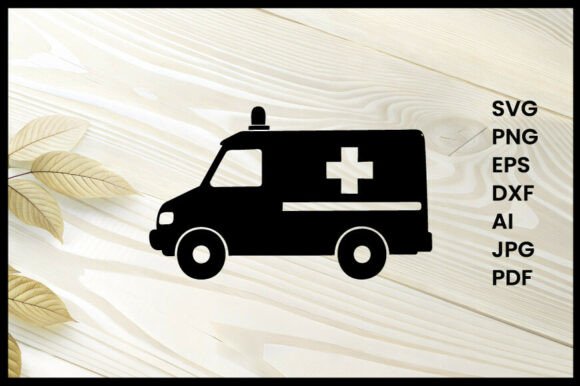
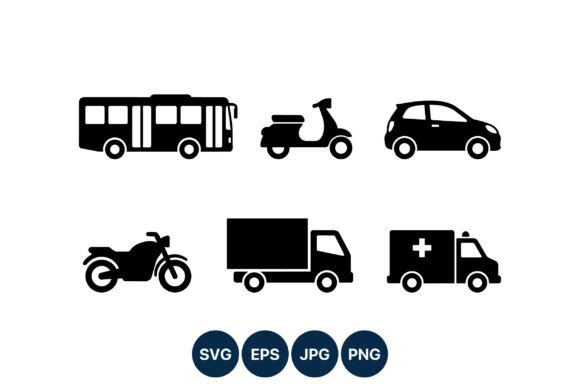
When I opened the Black Vehicle Silhouette Icons Set, my first thought wasn’t “cute” or “trendy”—it was “this will stitch cleanly.” Six icons—bus, scooter, compact car, motorcycle, cargo truck, and ambulance with a subtle medical cross—rendered in solid black, no outlines, no gradients, no internal detail beyond what’s essential. That simplicity is intentional, and it’s exactly why this set feels like a working designer’s tool—not just another graphics download. The silhouettes are balanced in weight and proportion, with consistent stroke thickness and generous negative space. They don’t shout; they anchor. I immediately pictured them on a natural linen tote bag for a local bike co-op, or stitched in matte black thread on a charcoal sweatshirt for a pediatric clinic’s staff gift.
Where It Shines: Real Projects, Real Fabric, Real Customers
This isn’t a design that demands attention—it earns it through clarity and context. As an embroidery designer who ships 50+ custom orders per month, I’ve used the Black Vehicle Silhouette Icons Set on baby onesies (scooter and compact car), embroidered patches for a food delivery startup (cargo truck), and as subtle chest accents on unisex aprons for a coffee roastery. Each time, the result felt intentional—not decorative filler. The ambulance icon, in particular, landed with quiet professionalism on hospital volunteer caps; the medical cross reads clearly at 1.8" tall without turning muddy or losing definition.
For Etsy sellers and small shop owners, this set bridges function and feel: it works equally well as a machine embroidery design for personalized gifts and as clean digital design assets for printable mockups. I’ve layered the scooter SVG into Canva templates for social posts—and used the same file to generate a satin-stitch applique design for a boutique tea towel line. Because all six icons share the same visual language, customers recognize the collection across products, reinforcing brand consistency even when you’re selling standalone items.
Where to Pause: Texture, Scale, and Stitch Behavior
That clean silhouette? It’s your friend—but only if you respect its limits. On highly textured fabrics like terry cloth or bouclé, fine details (like the gap between the ambulance’s doors or the scooter’s handlebars) can blur under dense fill stitch. I recommend using a medium-weight cutaway stabilizer and reducing stitch density by 10–15% for those areas. On stretchy fabric—think ribbed knit tees or baby jersey—test the compact car icon first at 2.2" wide; smaller versions (<1.5") risk distortion during hooping and stitching.
Dark fabric is where this set truly excels—black thread on navy, charcoal, or deep olive reads crisp and confident. But on light fabric, especially thin cotton or poplin, avoid going smaller than 1.7". At tiny scales, the ambulance’s cross risks becoming a blob rather than a symbol. And while the icons translate beautifully to curved surfaces like caps, skip the bus or cargo truck there—their horizontal width creates tension on the front panel. Stick to the scooter, motorcycle, or compact car for headwear.
What This Means for Your Finished Product
Clarity builds trust. When a customer orders a personalized embroidered patch with the motorcycle icon, they expect recognition—not interpretation. The Black Vehicle Silhouette Icons Set delivers that. Its restrained detail avoids the “overworked” look that plagues busy embroidery files, so your handmade product feels refined, not cluttered. That perception lifts perceived value: buyers pay more for items that look professionally curated, not digitally assembled.
It also supports storytelling. A nursery decor shop used the bus and ambulance icons on matching pillow covers for a first-responder baby shower—no text needed, just instant recognition and emotional resonance. For craft fairs or holiday markets, these icons pair effortlessly with neutral palettes and natural fibers, letting the craftsmanship—not the graphics—take center stage.
Practical Notes Every Embroidery Designer Should Check
- Always test on scrap fabric first—especially if pairing with a new stabilizer or thread brand. Watch how the ambulance cross fills; adjust underlay if corners pull.
- Review stitch density before scaling up. At 3", the cargo truck’s body area can become overly dense on lightweight fabric—trim fill density manually or use a lighter underlay.
- Confirm hoop size compatibility. None of the icons exceed 3.5" in any dimension, but layout matters: if combining two icons (e.g., scooter + compact car) for a tote bag design, map spacing early.
- Inspect small details at actual stitch-out size. Zoom in on your embroidery software—look for stray nodes or micro-gaps in the ambulance cross or scooter wheel arches.
- Test in black-and-white mockups before finalizing listings. These icons rely on contrast, not color, so grayscale previews reveal real-world readability.
- Compare light and dark fabric backgrounds in your design software. What reads bold on black may disappear on ecru unless you adjust thread weight or add subtle outline stitches.
- Use proper stabilizer: cutaway for knits and stretchy fabrics, tear-away for stable wovens like canvas or twill.
- Verify licensing before selling finished items or bundling the files as part of a digital product. The download includes SVG, PNG, and JPG—but commercial embroidery rights aren’t implied unless stated.
Final Thought: A Quiet Workhorse, Not a Flashy Gimmick
The Black Vehicle Silhouette Icons Set won’t go viral on Pinterest—and that’s its strength. It’s built for repetition, reliability, and real-world wear. Whether you’re an Etsy seller building a cohesive craft business, a boutique owner curating thoughtful holiday embroidery, or a maker stitching personalized gifts for neighbors and nurses, this set gives you confidence in consistency. It doesn’t ask for attention—it earns respect, one clean, well-stitched icon at a time. For designers who value function, flexibility, and finish over flair, it’s not just another graphics download. It’s a quietly indispensable part of the toolkit.